How to Build a Telegram Bot for Your Business Without Coding
A practical guide to preparing business details, describing a bot scenario, connecting Telegram, and testing the first customer request.
A customer messages your salon after closing time. They want to know the price of a manicure, where you are, and whether they can visit tomorrow. Someone will reply in the morning. Until then, the customer has to wait or look for another place with clearer information.
A small Telegram bot can handle the first part of that conversation. It can show services, explain your opening hours, and collect a request. Your receptionist can then contact the customer to agree on an appointment. The useful outcome is a request that someone can act on, with enough information to follow up.
This guide uses a fictional nail studio to explain the process in Askora, where you can create an initial bot scenario from a written description. You will prepare the business details, describe the customer journey, review the result, and connect a test bot to Telegram. The sample business and prices are examples, not a customer case study.
Choose one job for the first version
For our salon, the job is straightforward: help a customer choose a service and leave their contact details. Prices and directions support that decision. They should be available before the customer is asked to submit personal information.
Start with four menu options: “Services and prices,” “Request an appointment,” “Address and hours,” and “Contact the receptionist.” This gives visitors enough information to decide whether to get in touch, while keeping the request process short.
You may eventually want payments, reminders, loyalty rewards, or a connection to your booking calendar. Each of those adds rules that need testing. A payment flow needs to handle failed transactions. A calendar needs a reliable way to check availability and reserve a slot. Put those requirements in a separate list instead of including everything in the first version.
Write down what a successful test will look like. A person opens the bot on their phone, finds the price of a service, submits a request, and the receptionist receives the service choice and contact details. That is a specific result you can check before sharing the link.
Prepare the facts about your business
| Prepare | Example |
|---|---|
| Services | Name and what is included |
| Prices | Base price and extra charges |
| Contact details | Address, hours and responsible person |
| Request fields | Service, name and contact method |
Collect your service names, prices, address, opening hours, and contact information in one document. Add conditions that affect the price. If removing an old gel coating costs extra, say so. If a service is priced after an assessment, explain how the customer can get an estimate.
Use information you would be comfortable sending to a customer yourself. “Open until late” is difficult to act on. “Monday to Saturday, 10 am to 7 pm” answers a practical question. If your hours vary, give a reliable contact method for checking the current schedule.
Decide what you need in a request. For this example, the service, a name, and a contact method are enough to begin a conversation. A preferred day can be useful if the receptionist uses it when checking availability. A long questionnaire is unlikely to help someone who only wants to book a manicure.
Also decide who handles incoming requests. Someone needs to check them, reply during the stated hours, and cover for the usual receptionist when they are away. Building a form does not settle those responsibilities. A request that nobody reads will still leave the customer waiting.
Keep the original business information in a place your team can update. You will need it again when prices change or a service is removed from the menu.
Describe the customer journey in Askora
Open Askora and describe what the customer should do. You do not need to write code or know the names of internal blocks. You do need to supply the information the bot should show and the order of the request steps.
“Make a bot for my salon” leaves many decisions open. Does it need to take payments? Reserve appointments? Show a price list? Collect a phone number? A more specific description reduces the amount of correction required after the first version is created.
Here is an example you can adapt. The studio, address, and prices are fictional.
Create a Telegram bot for a fictional nail studio called Line.

Main menu: Services and prices; Request an appointment; Address and hours; Contact the receptionist.

Services: manicure without polish, $25; gel manicure, $45; gel removal, $10. Do not add services, discounts, or offers that are not listed here.

Address: 10 Garden Street, a fictional address for this example. Hours: Monday to Saturday, 10 am to 7 pm. Closed on Sunday.

For an appointment request, ask for the service, the customer's name, and a phone number or another contact method. Let people view prices without leaving contact details. Allow them to cancel the request and return to the main menu during data entry.

After submission, say: “Your request has been received. Our receptionist will contact you during opening hours to agree on a date and time.” Do not say that an appointment is confirmed or that a time slot is available.

Ask for clarification when information is missing. Keep messages short and use the business facts provided above.
Replace the sample details before using the description for your business. A bot should not invent an address, opening hours, or a discount simply because the information was missing from the prompt.
If your pricing has exceptions, describe them directly. For example, “The listed price covers a single colour; nail art is quoted separately.” That gives the customer a useful expectation and gives you something concrete to check in the generated messages.
Review the scenario from the customer's side
Once the scenario is created, open the preview and go through it as a first-time visitor. Start with prices. Can you find the service you want? Are extra charges explained? Can you return to the main menu without restarting the conversation?
Then check the address and hours against your source document. A plausible address is still wrong if it is not yours. Review names and numbers carefully, including service durations if you provided them.
Follow the request process all the way to the final message. A polished greeting tells you little about what happens after a customer enters their details. The final response should explain who will contact them and whether an appointment has actually been agreed.
When something needs changing, ask for a specific edit. “Shorten the greeting to two sentences and move the opening hours into Address and hours” is easier to review than “Make the bot better.” Another useful request is “Add a button from the price list to the appointment request, and make cancellation return to the main menu.”
Run through the affected steps again after each change. Check nearby routes too. A correction to one button should not leave another route pointing to a message that no longer makes sense.
Read button labels on a narrow screen. “Services and prices” tells the customer what to expect. “Learn more” could mean almost anything. Keep labels specific and short enough to remain readable on a phone.
Be clear about appointment requests
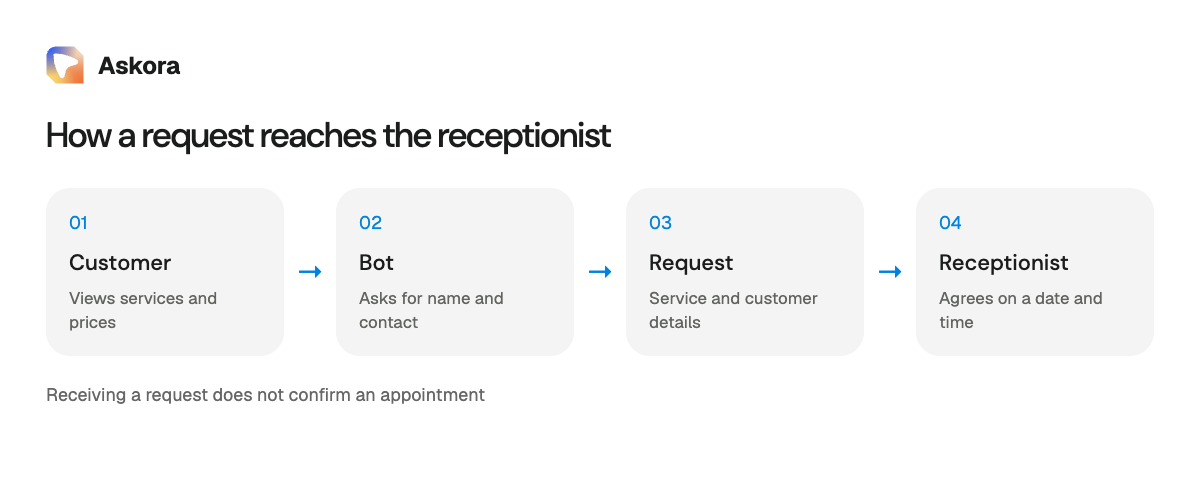
This example collects a request. A receptionist checks the schedule and agrees on a time afterwards. The bot should therefore avoid telling the customer that they are already booked for tomorrow.
A suitable confirmation is: “Your request has been received. Our receptionist will contact you during opening hours to agree on a date and time.” If your team has a response-time commitment it can consistently meet, you can include it. Otherwise, give the working hours rather than a promise that someone will reply in five minutes.
The same distinction matters for repair services, consultations, and deliveries. Receiving the information is one event. Accepting an order or reserving an appointment is another. Match the message to the event that has actually happened.
Automatic booking requires a verified source of available time slots and a process for reserving them. Until that is configured and tested, leave scheduling with a person. A customer should never have to guess whether a button has reserved their place.
Connect a test bot to Telegram
Askora provides separate connection paths for a new bot and an existing one. For a first attempt, use a dedicated test bot. It lets you review the customer journey without changing how existing customers reach your business.
For a new bot, follow the instructions in the connection window. The flow takes you to Telegram, asks you to start the conversation and create the bot, and then return to Askora. Check the suggested name and username before confirming them. The username is part of the address customers will use to find the bot.
For an existing bot, use the connection option that asks for its token from BotFather. BotFather is Telegram's official bot-management tool. Telegram documents the creation and management process in its bot feature guide.
Treat the token as a credential that grants control of the bot. Enter it only in the field intended for connecting the bot. Do not put it in an AI prompt, publish it in a screenshot, or send it to customers. If you record a demonstration, hide the entire token before sharing the recording.
If the existing bot is connected to another platform, moving it can change where its messages are processed. Make a separate test scenario and a transition plan first. Entering a token into a new service does not demonstrate that old customer data, payment flows, or every conversation branch has been transferred.
Test in an actual Telegram conversation
The preview is useful for reviewing the scenario. You still need to check the connected bot in Telegram. Open it on a phone, press Start, and follow the customer journey again. Read the messages and tap every menu option.
Submit a test request using a fictional name and a contact method you control. Check the owner's side of the process. The person handling requests should be able to identify the service and contact the customer without searching through unrelated messages.
Set up the owner's request notifications through the relevant step in Askora. Then verify the result by sending a request. Seeing a setup button or a connected status is not enough: the responsible person needs to receive the information where they will actually work with it.
Ask someone else to try the bot without instructions from you. Let them choose their own route. If they cannot find the price or do not know whether the request was submitted, that is useful evidence about the menu or wording.
Ask concrete follow-up questions: “Where did you expect to find prices?” “What happens after submitting?” “How would you cancel?” These are easier to answer honestly than “Was everything convenient?” They also point to changes you can make.
Include mistakes in your test
People make typing errors and change their minds. Try submitting a short string of digits in the contact field, then ordinary text. Check whether the response matches the kind of input you intended to collect.
A phone number field and an open contact field need different rules. A Telegram username might be valid in the second and inappropriate in the first. Define what is acceptable and verify it. Do not assume that every generated field automatically applies the validation you want.
Cancel halfway through a request. The customer should know it has not been sent and should be able to start again. Try submitting another request after completing the first one. Check that a previous service choice or name does not appear unexpectedly.
Use the following list for the final review. Decide on the expected result for each item before comparing it with the bot's actual behaviour.
- A new visitor can start the bot and understand the menu.
- Every menu option opens the intended information.
- Prices and opening hours match the business's records.
- Information pages provide a route back to the start.
- Viewing prices does not require contact details.
- A request includes the service and a contact method.
- Invalid input receives a clear response.
- Cancellation does not send an unfinished request.
- A second request does not reuse answers unexpectedly.
- Messages and buttons remain readable on a phone.
- The responsible person receives the test request.
- The final response explains the next step without implying an unconfirmed booking.
Share a link people can understand
Once the request flow works, place the link where customers already look for your contact details: your website, a Telegram channel description, or your business profile. Label it with what people can do inside, such as “View prices and request an appointment on Telegram.”
Keep a familiar way to contact the receptionist during the first days of use. Watch for questions the bot does not answer clearly. If customers repeatedly ask whether gel removal is included, add that information to the price list. If they expect immediate confirmation, revise the final request message.
A QR code can help on a counter or printed card. Scan it with a phone before printing a batch. Check that it opens the intended bot and that the printed description still matches the bot's purpose. Keep another contact option for customers who do not use Telegram.
Avoid placing the same generic call to action everywhere. A person reading a price list needs a different next step from someone checking your address. In both cases, explain what the bot will help them do.
Keep the information current
Assign someone to maintain the scenario. When prices change, update the bot as well as the website. When a service is removed, check both the menu and the request form. A receptionist should not receive a new request for something the business no longer offers.
Keep a short record of changes and dates. It can help explain why a customer saw an older price or why a request mentioned a service that has since been renamed. After making a change, run through that part of the conversation from beginning to end.
During the first week, review requests manually. Check whether the information is sufficient for a reply, which messages cause confusion, and where people abandon data entry. Add a field only when it helps the team handle a request. More information is not automatically more useful information.
Measure a practical result: valid requests received and the time required to handle them. To claim an improvement, you need a baseline from the previous process. Without one, a neat bot interface cannot establish that sales increased or receptionist workload was cut in half.
Questions before you launch
Do I need a developer?
The menu and request scenario described here can be built in a no-code tool. Custom integrations, unusual validation requirements, or synchronisation with a booking calendar need a separate assessment.
Will AI answer every customer question?
Creating a scenario from a written description is different from enabling open-ended AI replies in a customer conversation. This guide uses prepared menu options and request steps. Check the availability and configuration of any free-form reply feature separately.
Can this bot collect payments?
Payments require a separate provider configuration and payment-flow testing. The example in this guide collects a request without charging the customer. Before adding payments, check successful and failed transactions, duplicate notifications, and how refunds are handled.
How much will it cost?
Review Askora's current plans and the limits shown in your account. Check what is included, when allowances renew, and whether additional usage has a separate cost. A fixed price in a guide can become outdated, so use the current product information when deciding.
What should I do first?
Prepare an accurate service list and describe one request journey. Open Askora, use your business details in the prompt, and review the scenario from the customer's side. Connect a test bot to Telegram and send a request. Once the responsible person receives the information and can act on it, you have a tested flow to share with customers.
Build a bot like this